
Last updated on
Oct 31, 2026
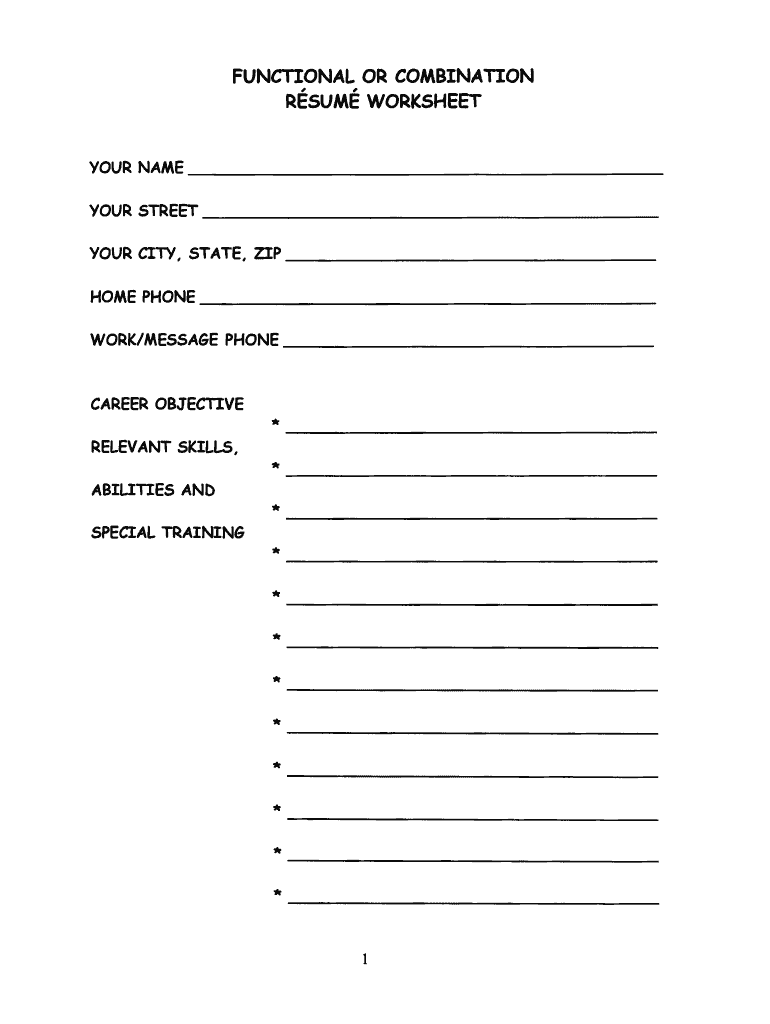
Functional or Combination Resume Worksheet free printable template
pdfFiller is not affiliated with any government organization

Fill out
Complete the form online in a simple drag-and-drop editor.

eSign
Add your legally binding signature or send the form for signing.

Share
Share the form via a link, letting anyone fill it out from any device.

Export
Download, print, email, or move the form to your cloud storage.
Why pdfFiller is the best tool for your documents and forms


End-to-end document management
From editing and signing to collaboration and tracking, pdfFiller has everything you need to get your documents done quickly and efficiently.
Accessible from anywhere
pdfFiller is fully cloud-based. This means you can edit, sign, and share documents from anywhere using your computer, smartphone, or tablet.
Secure and compliant
pdfFiller lets you securely manage documents following global laws like ESIGN, CCPA, and GDPR. It's also HIPAA and SOC 2 compliant.
What is Functional or Combination Resume Worksheet
The Functional or Combination Resume Worksheet is a document used by job seekers to create effective resume formats that highlight skills and experience.
pdfFiller scores top ratings on review platforms




This service works well. It's simple and easy to use.
Extremely valuable in court or tax cases
Who needs Functional or Combination Resume Worksheet?
Explore how professionals across industries use pdfFiller.

Functional or Combination Resume Worksheet is needed by:
-
Job seekers looking to enhance their resume creation process
-
Career counselors who assist clients in job applications
-
Students preparing to enter the job market
-
Professionals changing careers and needing a new resume format
-
Recruitment agencies assisting clients in job applications
Comprehensive Guide to Functional or Combination Resume Worksheet
What is the Functional or Combination Resume Worksheet?
The functional or combination resume worksheet is a strategic tool designed to assist job seekers in crafting effective resumes. This worksheet supports both functional and combination resume formats, emphasizing skills over a conventional job history. By using this worksheet, applicants can highlight their relevant skills and experiences, which is crucial for successful job applications.
Benefits of Using the Functional or Combination Resume Worksheet
Utilizing the functional or combination resume worksheet offers numerous advantages for job applicants. Firstly, it enables users to tailor their resumes specifically to the job they are applying for, resulting in more focused applications. Secondly, it encourages users to highlight relevant skills and experiences, enhancing their marketability. Lastly, the worksheet promotes an organized presentation of information, making it more attractive to potential employers.
Key Features of the Functional or Combination Resume Worksheet
This worksheet comes with several key features designed to enhance user experience. It offers a user-friendly format that streamlines the resume creation process. Additionally, users can edit, save, and export their resumes in various formats, including PDF and DOCX. The platform also allows customization of fields, enabling users to showcase unique skills and experiences effectively.
Who Should Use the Functional or Combination Resume Worksheet?
The functional or combination resume worksheet is ideal for various job seekers. This includes individuals with gaps in their employment history or those looking to transition into a new career. It is also beneficial for candidates who want to emphasize specific skills rather than adhering to a linear job history. Furthermore, recent graduates entering the job market for the first time can greatly benefit from this resource.
How to Fill Out the Functional or Combination Resume Worksheet Online (Step-by-Step)
Completing the functional or combination resume worksheet online is a straightforward process. Follow these steps:
-
Access the worksheet through pdfFiller’s platform.
-
Utilize prompts and guidance to fill out various sections.
-
Save and download your completed resumes securely.
Field-by-Field Instructions for the Functional or Combination Resume Worksheet
To maximize the effectiveness of the worksheet, it is essential to understand each section's requirements. Users should carefully fill out fields related to skills, experiences, and qualifications. Additionally, tips for effectively communicating achievements within the context of the resume are provided to enhance clarity. Tailoring content to closely match job descriptions is also crucial for increased chances of success.
Common Errors to Avoid When Completing the Worksheet
To ensure a polished and professional final product, users should be aware of common errors that can undermine their resumes. Avoid highlighting skills that do not relate directly to job applications. Additionally, failing to proofread for grammatical and formatting issues can detract from the overall quality. It is also essential not to overload the resume with unnecessary information that might dilute key points.
Security and Compliance When Handling Your Resume Worksheet
When using the functional or combination resume worksheet, it is vital to consider document security and compliance. pdfFiller implements robust security measures, including 256-bit encryption, to protect your data. The platform is compliant with GDPR and HIPAA standards, ensuring the confidentiality of personal information. Users should also take necessary precautions when sharing their documents to maintain privacy.
How to Use pdfFiller to Enhance Your Resume Worksheet Experience
pdfFiller offers a range of features to enhance your resume worksheet experience. The platform provides benefits such as easy editing and eSigning of resumes, streamlining the application process. Users can access their documents from any device without the need for downloads. Additionally, collaboration features allow for seamless sharing with mentors or career advisors, further improving the quality of the application.
Start Crafting Your Perfect Resume Today!
By utilizing the provided tools, users are encouraged to begin the resume crafting process with confidence. The functionalities offered by pdfFiller empower users to create standout resumes that attract potential employers. Rest assured, pdfFiller ensures a secure, cloud-based experience while you develop your professional documents.
How to fill out the Functional or Combination Resume Worksheet
-
1.To access the Functional or Combination Resume Worksheet on pdfFiller, visit the pdfFiller website and use the search bar to find the form by name.
-
2.Once located, click on the form to open it in the pdfFiller editor where you can begin filling out the details.
-
3.Before filling the form, gather necessary personal information, work history, education details, skills, and relevant experiences that you want to include in your resume.
-
4.Navigate through the form fields using the interactive editor. Click into each section and input the required information, such as job titles, dates of employment, and descriptions of your responsibilities.
-
5.Use pdfFiller's tools to format your resume. You can modify font styles, sizes, and formatting to ensure the resume is professional and appealing.
-
6.After completing all fields, review the form for any errors or missing information. Make sure each section effectively represents your experiences and skills.
-
7.Once satisfied with the content, save the form to your pdfFiller account or download it directly to your device for future use or submission in various job applications.

Who can use the Functional or Combination Resume Worksheet?
Any job seeker can utilize the Functional or Combination Resume Worksheet to improve their resume format and content, regardless of experience or industry.
How do I submit the Functional or Combination Resume Worksheet?
Once completed, you can save the document as a PDF or print it directly for submission to potential employers. Ensure you follow any specific submission guidelines provided by the employer.
Are there specific fields required in the Functional or Combination Resume Worksheet?
While there are no mandated fields, it's essential to include relevant personal information, work experience, education, and skills that match the job you are applying for.
Can I edit the Functional or Combination Resume Worksheet after downloading?
Yes, you can modify the downloaded document using any PDF editing software or return to pdfFiller to make changes before finalizing your resume.
What are common mistakes to avoid when filling out this worksheet?
Avoid including irrelevant information, making grammatical errors, or using non-constructive language. Ensure clarity and conciseness in each section.
Is there a time limit for completing this worksheet?
There is no specific time limit for completing the Functional or Combination Resume Worksheet. Take your time to ensure it accurately represents your qualifications.
What should I do if I encounter issues while using pdfFiller?
If you face any issues, refer to the help section on the pdfFiller site, or contact their support team for assistance with the functionality of the worksheet.
Related Content
Related Forms




Related Catalogs
Get the latest insights from our blog


If you believe that this page should be taken down, please follow our DMCA take down process
here
.
This form may include fields for payment information. Data entered in these fields is not covered by PCI DSS compliance.